Did you notice councils and the Met Police websites going dark last week? That was PHP2Shell. Two critical flaws sit inside PHP itself, so even a tidy, well-built site can be exposed. You do not need to be a developer to find out where you stand: this simple guide will explain everything to you.
What Is PHP2Shell?
PHP2Shell is the nickname for CVE-2026-109618 and CVE-2026-109619, two critical PHP vulnerability flaws (rated 9.2) that let attackers run code on a server without logging in. PHP runs roughly 70% of sites with an identifiable server-side language, so the NCSC urged UK organisations to act. In the riskiest setup, Apache with mod_php, an attack can land before your own code even runs. Updating WordPress or a plugin will not help: the fix must reach your server.
Why Speed Matters
Amazon recorded an exploitation attempt on 17 October, four days before PHP published its fixes. Waiting for a convenient maintenance window is a gamble.
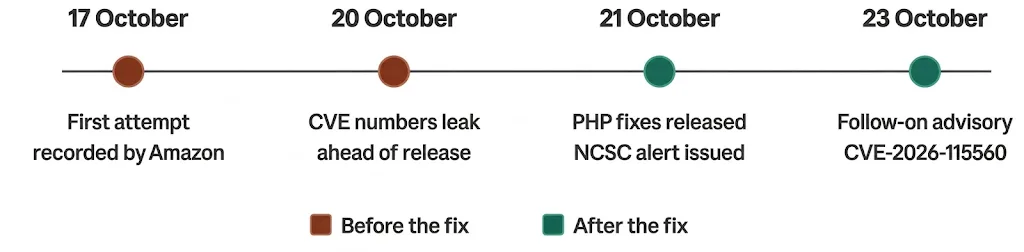
PHP2Shell timeline, October 2026.
How to Check If Your Website Is Affected
Here is a simple process to check if your website is affected by PHP2Shell or any other vulnerability.
Step 1: Find the PHP Version Your Site Really Uses
WordPress: Tools → Site Health → Info → Server
cPanel: Select PHP Version. Plesk: PHP Settings.
Managed by an agency? Ask which PHP version and package serve your domain.
Our PHP version detector shows what your site reveals publicly. Many servers hide it, so treat the result as a clue, not proof.
Imagine a small online shop on shared hosting. Site Health shows PHP 8.1, which is enough to raise a support ticket today.
Step 2: Compare It With the Fixed Releases
PHP branch | Fixed release |
|---|---|
8.5 | 8.5.12 |
8.4 | 8.4.27 |
8.3 | 8.3.36 |
8.2 | 8.2.35 |
8.1 and older | No official release |
Source: PHP security advisory
Anything below your branch’s fixed release needs updating. PHP 8.1 and older needs a vendor backport or an upgrade, and PHP 8.2 security support ends on 31 December 2026.
Step 3: Do Not Trust the Number Alone
Linux distributions often patch without changing the version. Ubuntu 24.04’s fixed package, for example, still reports 8.3.6. On Debian or Ubuntu, search the changelog:
zgrep -E "CVE-2026-10961[89]" /usr/share/doc/php*-common/changelog.Debian.gz
A match means the fix is installed. Restart PHP-FPM or Apache afterwards, because running processes keep the old code. On shared hosting, ask your provider in writing. Avoid public phpinfo pages, which hand attackers useful details. Our earlier guide goes deeper.
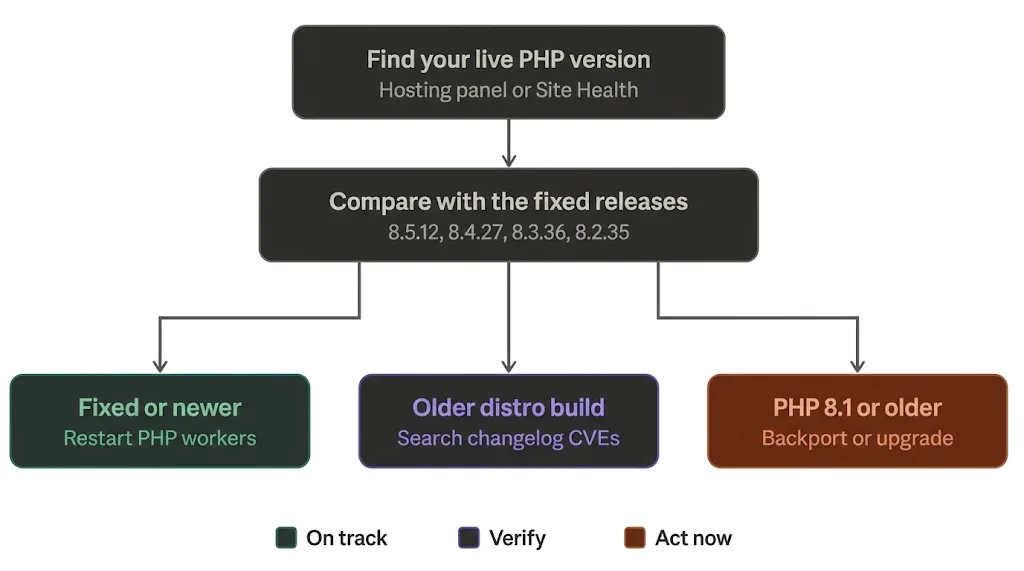
Your PHP2Shell check at a glance.
Step 4: Look for Signs of Compromise
If your site was unpatched at any point since 17 October, check that it was not hit first. Warning signs:
Unfamiliar PHP files in your web root or uploads folder
New admin users or scheduled tasks you did not create
Repeated HTTP 500 errors or crashing PHP workers
Unexpected outbound connections from your web server
Found something? Treat it as an incident and rotate passwords and API keys once patched.
Which Next Step Fits Your Setup?
Your setup | Next step |
|---|---|
Shared or managed hosting | Ask your host to confirm the fix and restart, in writing |
VPS or dedicated server | Update with apt or dnf, then restart PHP |
Docker | Pull the patched image, rebuild, recreate containers |
Control panels or appliances | Ask the vendor for a fixed build |
Automattic reports that sites on WordPress.com, WordPress VIP, WP Cloud and Pressable are already protected.
Quick Wins While You Patch
A firewall such as Cloudflare buys time, but it is not a fix.
PHP suggests setting session.upload_progress.enabled=0 until its next release, because of a separate flaw (CVE-2026-115560).
Watch vendor advisories, because some products bundle their own PHP.
Cannot patch yet? The NCSC says consider taking the system offline.
When to Call in Help
On PHP 8.1 or older, running a custom application, or not getting a straight answer from your host? Ask for help early. Our website development and DevOps teams confirm which PHP serves your site, test plugins against a newer version and coordinate with your provider. Never send server passwords by email or chat.
PHP2Shell FAQs
Here are answers to the questions we hear most often.
Does updating WordPress fix PHP2Shell?
No. The flaw lives in PHP, so only a server-side PHP update helps.
Can a PHP version detector prove I am safe?
No. It reports only what is visible, and backported fixes hide behind old numbers.
Is PHP2Shell being exploited?
Yes. Cloudflare reported attack traffic against its customers, and Amazon says exploitation is now widespread.
Is PHP 8.1 safe if I do nothing?
No. It has no official fix, so you need a vendor backport or an upgrade.
Final Words
Checking takes minutes; recovering from a breach takes far longer. Confirm your version, verify the fix, restart PHP, and make PHP cyber security a routine habit. Cyber Essentials Plus and ISO 27001 certified, GSS Tech Solutions will confirm which PHP serves your site and work with your host. Run the PHP version detector or talk to our team on 0203 599 8122.