You’ve seen the PHP2Shell headlines, opened a terminal, typed php -v, and got back “8.3.6”. So, are you safe? Honestly, that number alone can’t tell you. Like many PHP security issues, the real answer takes a little more digging, and this guide walks you through it.
On 21 October 2026, PHP released emergency security updates for two critical flaws, CVE-2026-109618 and CVE-2026-109619. Both are rated 9.2 and could let an attacker run code on a web server without logging in.
What Is PHP2Shell and Why Should You Care?
Most PHP vulnerabilities live in a plugin or theme. PHP2Shell is different. The flaws are in PHP itself, so even a simple, well-written application running on an affected version can be vulnerable. Researchers also showed attackers could read passwords, tokens, and API keys from server memory, which makes this a data security problem as much as a web security one.
Artificial intelligence played a big part too. The flaws had sat in PHP for over a decade, but frontier AI models helped researchers develop working exploits in hours. Attackers are moving fast as well: Amazon spotted an exploitation attempt on 17 October, four days before public disclosure.
Why Your PHP Version Number Might Lie to You
Here are some of the key reasons.
Reason 1: Linux distributions backport fixes
The official fixed releases are 8.5.12, 8.4.27, 8.3.36, and 8.2.35. However, distribution packages don’t follow upstream numbering. Ubuntu 24.04’s patched package, for example, still reports 8.3.6.
Reason 2: Your terminal isn’t your website
The command-line PHP can show as patched while the PHP your web server actually runs is not.
What you see | What it might mean | What to do |
|---|---|---|
8.5.12, 8.4.27, 8.3.36 or 8.2.35 | Patched upstream release | Confirm your web server uses this build |
An older number, such as 8.3.6 | Possibly patched by your distribution | Check its security notice |
8.1 or older | End of life, fix not guaranteed | Ask about backports, plan an upgrade |
Patched in terminal only | Web PHP may differ | Check through the web server |
PHP 8.1 and older may not receive a fix, though some vendors provide one.
How to Check If You’re Vulnerable: 5 Steps
Check the PHP your website uses. Upload a temporary phpinfo() page, note the version, then delete it immediately.
Search your changelog for the CVE. On Ubuntu or Debian, run: zgrep CVE-2026-109618 /usr/share/doc/php8.3-common/changelog.Debian.gz (swap 8.3 for your version).
Restart every PHP worker after updating. Old processes keep running old code until they restart.
On shared hosting, ask your host in writing for the installed version and the date of the fix.
Avoid “fix” plugins and exploit scripts. Fake proof-of-concept code is already circulating on GitHub.
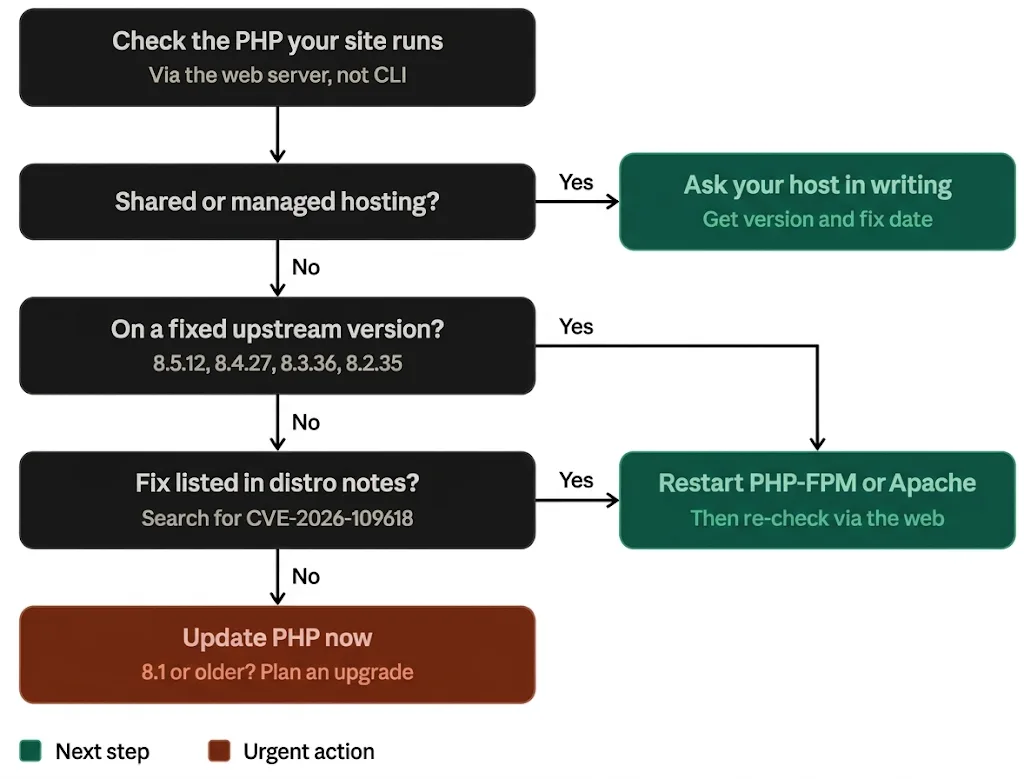
Flowchart showing how to check whether your PHP is patched against PHP2Shell.
PHP2Shell FAQs
Here are answers to the questions we hear most often.
Does Cloudflare protect me from PHP2Shell?
It helps, but it isn’t a fix. Cloudflare has added protective firewall rules on all plans, including Free, but it describes them as an extra layer of defence. You still need to update PHP itself.
Can a WordPress plugin fix PHP2Shell?
No. The flaw is in PHP, so nothing inside WordPress can patch it.
Is PHP2Shell being exploited right now?
Yes. Amazon reports broad exploitation in the wild and advises starting any investigation from at least 17 October.
Don’t Trust the Number, Verify It
PHP2Shell is one of the most serious PHP security vulnerabilities in years, but checking your exposure doesn’t have to be stressful. Verify the PHP your website actually runs, confirm the fix with your distribution or host, restart PHP, and keep good cybersecurity habits in place.
Not sure where to start? GSS Tech Solutions builds websites with PHP, Laravel, and WordPress, and we’re certified to ISO 27001 and Cyber Essentials Plus. Contact our team for a PHP2Shell check today.