Why the Fixes Kept Failing: A Lesson in Domino Effects
If Microsoft kept bringing servers back, why did Outlook keep dropping? Technology analyst Rupert Goodwins offered a simple answer. When a server comes back online, every waiting app tries to reconnect at once, the sudden rush swamps it, and it falls over again.
Walter Pasquarelli, an affiliate researcher at the University of Cambridge's Bennett School of Public Policy, used a traffic analogy. Picture a motorway that suddenly shrinks from four lanes to two. The cars do not disappear, so the remaining lanes jam, and the whole road grinds to a halt.
In other words, think of a supermarket that closes half its tills without warning. The queues at the open tills grow so long that those tills slow down too. That is exactly why Microsoft limited traffic in some places and warned that recovery would be gradual as apps reconnect.
Not the First Time: Microsoft's Rocky 2026
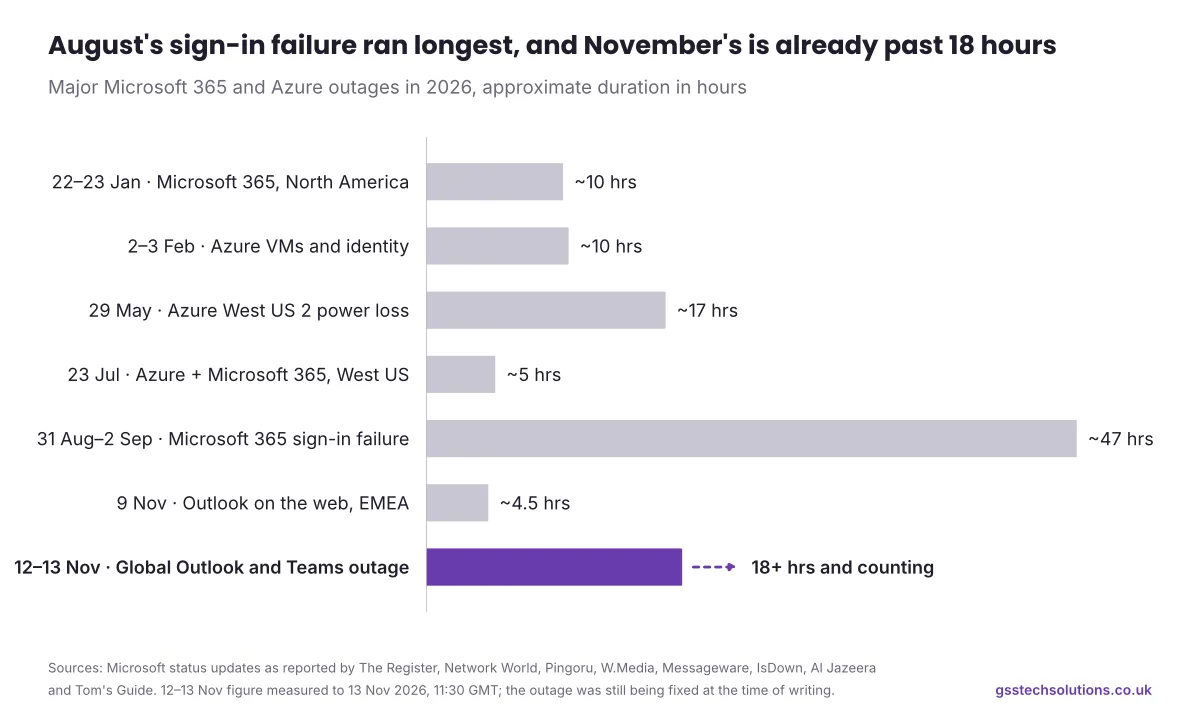
Sadly, this Microsoft outage did not come out of the blue. In January, Microsoft 365 went down across North America for almost ten hours. Then, in late August, a sign-in failure locked Outlook users out worldwide for roughly two days.
In between, Azure, the cloud platform beneath Microsoft 365, had its own bad days. A storm, a storage misconfiguration and an automation bug all took services offline at different points. Here is how the year has looked so far.

Date (2026) | What went down | What Microsoft blamed |
|---|
12–13 Nov | Outlook, Teams, Copilot, SharePoint and Defender XDR, worldwide | An overwhelmed secure-connection process on servers that dropped out (review pending) |
9 Nov | Outlook on the web for some users in Europe, the Middle East and Africa | A mailbox access issue that Microsoft fixed in about four hours (IsDown) |
13 Oct | Outlook, OneDrive, SharePoint, Teams and Windows 365 for Global Secure Access users | Part of the Global Secure Access network running below performance thresholds (IsDown) |
31 Aug – 2 Sep | Exchange Online, Outlook, Teams, SharePoint, OneDrive, Purview, Defender XDR and Copilot, worldwide | A core authentication configuration problem (Messageware) |
23 Jul | Azure and Microsoft 365, plus Xbox Live and the Microsoft Store | A bug in automated network maintenance removed routes from too many devices in West US (BleepingComputer) |
29 May | Azure services in the West US 2 region | A severe thunderstorm cut utility power to the datacentre (Pingoru) |
2–3 Feb | Azure virtual machines and managed identities | A misconfiguration in Microsoft-managed storage accounts (Network World) |
22–23 Jan | Outlook, Defender and Purview in North America | Service infrastructure in North America not processing traffic as expected (The Register) |
21 Jan | Teams and Outlook | A third-party networking issue (IBTimes) |
Notice the pattern? Most of these incidents started inside Microsoft's own systems, through configuration changes, automation bugs or overloaded infrastructure. Very few involved attackers at all.
For you, the takeaway is simple. Cloud services work brilliantly most of the time, but "most of the time" is not "all of the time". Therefore, planning for the rare bad day is simply good business.
The same lesson applies to your own website. An update can fix one problem and quietly open another, as we explained in PHP2Shell: Patched but Not Safe? What to Do After the Update. If your site runs on PHP, our PHP Version Checker gives you a quick health check.
The Real Cost of a Microsoft Outage for Your Business
An outage rarely shows up as a neat line on your balance sheet. Instead, it leaks out slowly through missed sales emails, late invoices, rescheduled calls and customers who simply could not reach you.
Take a typical 20-person firm. If each person loses just four productive hours, the business has lost 80 hours of work in a single afternoon. On top of that, your team then spends the next morning catching up, chasing replies and untangling duplicate messages.
There is a quieter cost too: trust. When a client's email bounces or a proposal goes missing, they rarely blame Microsoft; they remember that they could not get hold of you. Moreover, as Rupert Goodwins points out, most organisations rely on Microsoft with "intensive inertia", so walking away is rarely realistic. The smarter move is to plan around the weak spots.
What to Do Right Now If You Are Still Affected
If Outlook is still patchy for your team, do not panic. These five steps will help you ride out the rest of this Microsoft outage calmly and safely.
Above all, resist the urge to keep refreshing or reinstalling things. As the experts explained above, a flood of reconnections can actually slow recovery down.
1. Check the official status first
Before you start troubleshooting, check the Service health page in your Microsoft 365 admin centre and the @MSFT365Status account on X. This way, you know straight away whether the problem sits with Microsoft or with your own network.
2. Do not resend every email
Microsoft extended Outlook's email timeout window to 48 hours, so messages from services such as Gmail can still arrive once things recover (Tom's Guide). In other words, your mail is most likely delayed, not lost. Resending everything only creates duplicates later.
3. Switch to a backup channel
For anything urgent, pick up the phone, send a text or use another messaging tool your team already trusts. Then let key clients know about the delay before they start wondering where you are.
4. Watch out for outage-themed phishing
Scammers love a crisis. Over the next few days, expect fake "verify your Microsoft account" emails and texts, so never enter your password through a link you did not expect.
For more practical security lessons, read our breakdown of the Binance $6.3 billion hack and what UK businesses can learn from it.
5. Reconnect gently once service returns
When Microsoft confirms recovery in your region, close and reopen Outlook or sign out and back in. If problems persist after that, raise a ticket with your IT team or provider.
Can You Claim Compensation? Microsoft's SLA Explained
Possibly, yes. Most Microsoft 365 business services, including Exchange Online, Teams, SharePoint and OneDrive, carry a financially backed service level agreement (SLA) of 99.9% monthly uptime (Open Exam Prep). When a service falls below that level in your tenant, you can request a credit against that month's fees.
Monthly uptime for the service | Service credit |
|---|
Below 99.9% | 25% |
Below 99% | 50% |
Below 95% | 100% |
Source: Microsoft Learn
However, credits are not automatic. Your organisation's admin must file a claim with details of the downtime, the users affected and the steps you took to resolve it. Microsoft also calculates uptime per service and per tenant, so the final figure depends on how long your own people actually lost access.
Our advice is to start a simple log today. Note when problems started and ended, which services failed and how many staff were affected. That record will make any claim, and your own post-incident review, far easier.
Building an Outage-Proof Business: Six Lessons for Next Time
You cannot stop Microsoft's servers from failing. You can, however, decide how much a failure hurts you. Interestingly, Walter Pasquarelli expects most organisations to respond to this outage by strengthening their digital resilience rather than abandoning Microsoft altogether.
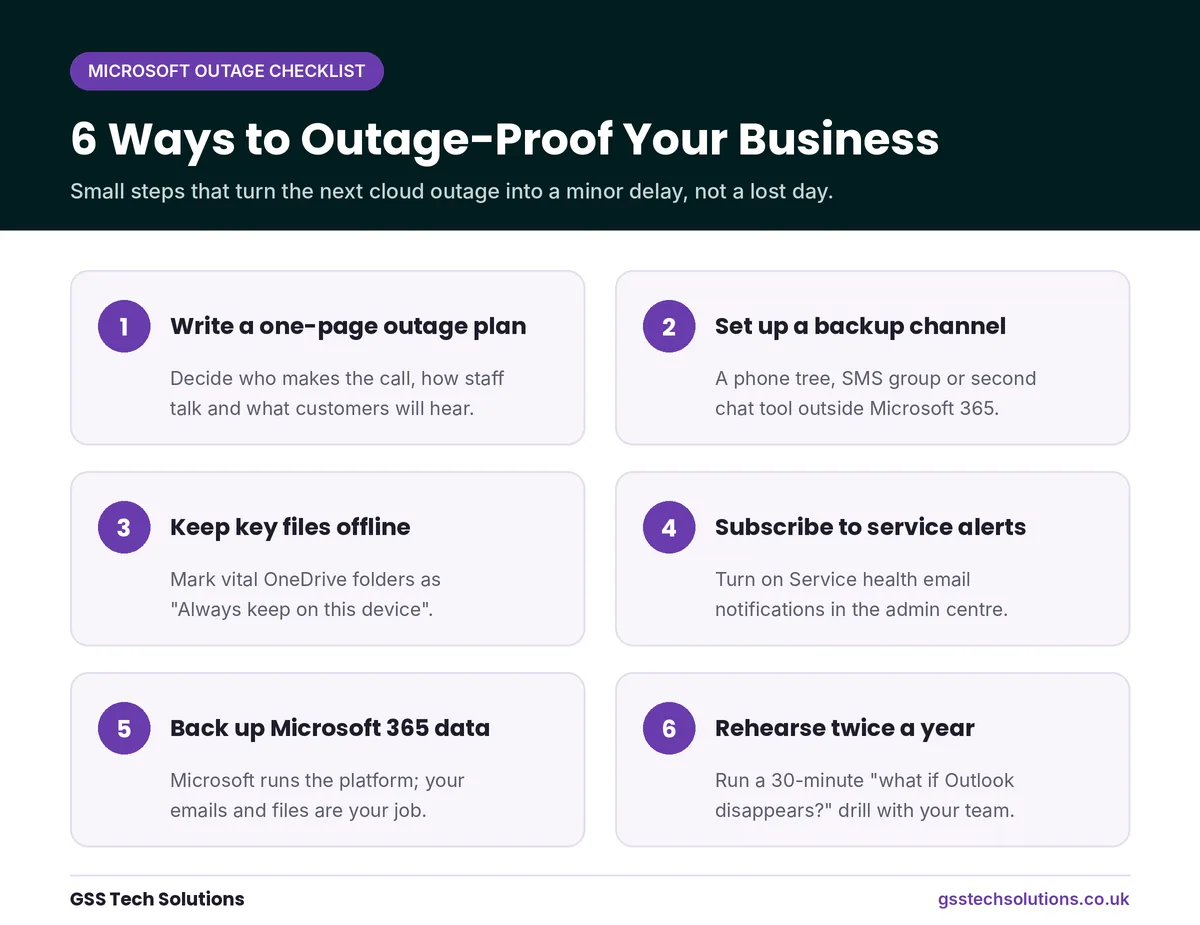

Here are six practical moves, from the quickest win to the deepest fix:
Write a one-page outage plan. Decide who makes the call, how staff will talk to each other and what customers will hear.
Set up a backup communication channel. A phone tree, an SMS group or a second messaging tool outside Microsoft 365 keeps everyone connected.
Keep critical files available offline. Mark your most important OneDrive folders as "Always keep on this device" so they open even when the cloud does not.
Subscribe to service alerts. Turn on Service health email notifications in the admin centre, so you hear about problems before your clients do.
Back up your Microsoft 365 data. Microsoft keeps its platform running, but protecting your own emails and files is your job.
Rehearse twice a year. A 30-minute "what if Outlook disappears?" drill quickly shows you where the gaps are.
None of these steps costs a fortune. Together, though, they can turn a day of chaos into a mild inconvenience. Best of all, the same plan protects you from internet cuts, power failures and other everyday disruptions.
How GSS Tech Solutions Can Help
At GSS Tech Solutions, we design, build and support websites, custom software and mobile apps for businesses in the UK and beyond. As a Cyber Essentials Plus and ISO 27001 certified agency, we treat resilience and security as part of every project, not an afterthought.
So, if this week's Microsoft outage left you wondering how exposed your business really is, let's talk. Our team can help you map the cloud services your website and systems depend on, spot the single points of failure, and put sensible fallbacks in place before the next bad day arrives.
Here is where our services fit in:
Ready to find your weak spots before the next outage does? Contact our team to talk through your setup.
Frequently Asked Questions
Is the Microsoft outage over?
Not completely, at the time of writing. Microsoft reports partial recovery across regions, and Outlook is returning for many users, but service health still varies. Check the Service health page in your admin centre for live updates.
What caused the Microsoft outage on 12 November 2026?
Microsoft says a number of servers became unexpectedly unavailable, and a process that sets up secure connections became overwhelmed. It has not yet published a full root cause.
Was the Microsoft outage a cyberattack?
No. Microsoft says there is no indication of malicious or cyber activity.
Will I lose emails sent during the outage?
Probably not. Microsoft extended Outlook's email timeout to 48 hours, so most messages should arrive late rather than vanish. Still, follow up on anything urgent.
Can my business get compensation for the Microsoft outage?
Possibly. If a service's monthly uptime in your tenant falls below 99.9%, your admin can file an SLA claim for a service credit of 25% or more.
How can I check whether Microsoft 365 is down?
Start with the Service health page in your Microsoft 365 admin centre. You can also follow @MSFT365Status on X or check Downdetector to see whether other people are reporting the same problem.
Final Words
The November 2026 Microsoft outage reminded millions of people how much of their working day lives in a handful of cloud services. For a few hours, a single overwhelmed process stopped emails, meetings and files in their tracks across 74 countries.
Yet outages like this do not have to throw your business into chaos. With a simple plan, a backup channel and a few sensible habits, the next one can feel like a minor delay rather than a lost day. Start small this week, and if you would like a hand, our team at GSS Tech Solutions is always happy to help. For more practical guides like this one, browse the GSS Tech Solutions blog.